· Philippe Daix · How It Works · 1 min read
Worklogs – Wiki
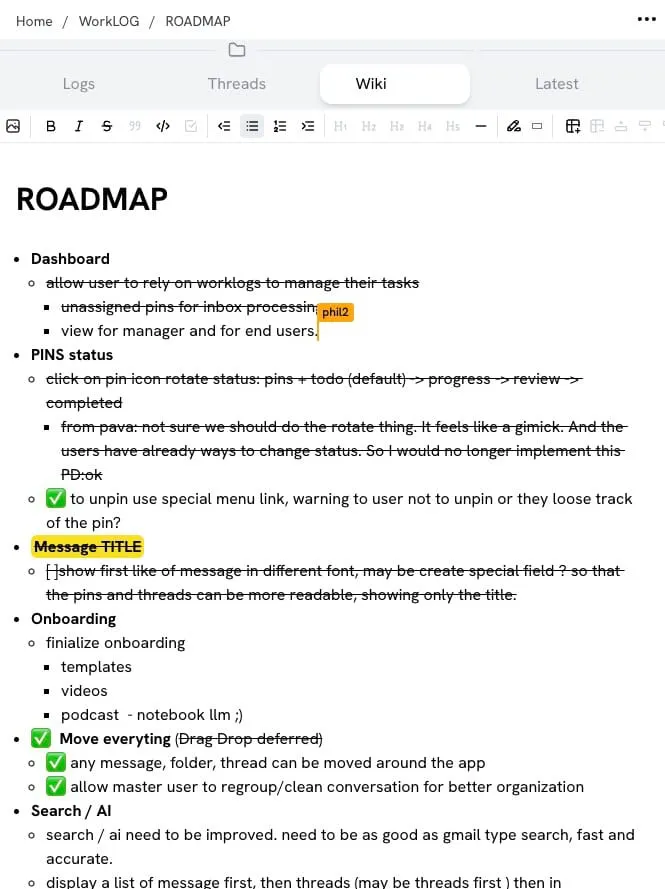
Each folder features a collaborative wiki page with Markdown support for specifications, roadmaps, journals, and brainstorming.

Each folder features a collaborative wiki page with Markdown support. The wiki can be customized for various purposes:
- Specifications – Document project requirements
- Roadmaps – Plan your project timeline
- Journal – Keep a running log of decisions and progress
- Brainstorm – Capture ideas as they come
Collaborative Editing
Wiki pages are shared among all folder members, making them perfect for documentation that the whole team needs to access and contribute to.
Markdown Support
Format your wiki content with full Markdown support:
- Headers and subheaders
- Lists and checklists
- Code blocks
- Links and images
- Bold, italic, and other text formatting
The wiki stays connected to your conversations, so context is never lost.